Introduction
In real Java applications, we rarely work with just one value.
Most of the time, we deal with:
A list of users
A set of permissions
A map of IDs and objects
A queue of tasks
Handling such data using normal variables is not possible.
This is where Java Collections come into the picture.
Java Collections are ready-made data structures provided by Java to store, manage, and process multiple objects easily and efficiently.
Understanding Java Collections is extremely important for:
Backend development
Real-world applications
- Java interviews
Before starting interview preparation, it’s important to follow a structured Java backend developer roadmap so you don’t miss core fundamentals.
Java Backend Developer Roadmap 2026
Why Java Collections Are Needed
Before Java Collections, developers used arrays.
Arrays have multiple problems:
Fixed size (cannot grow or shrink)
No built-in methods for sorting or searching
Difficult to manage large and dynamic data
Java Collections solve all these problems:
Dynamic size
Easy add, remove, and update
Built-in algorithms
Cleaner and readable code
Java Collections Framework – Big Picture
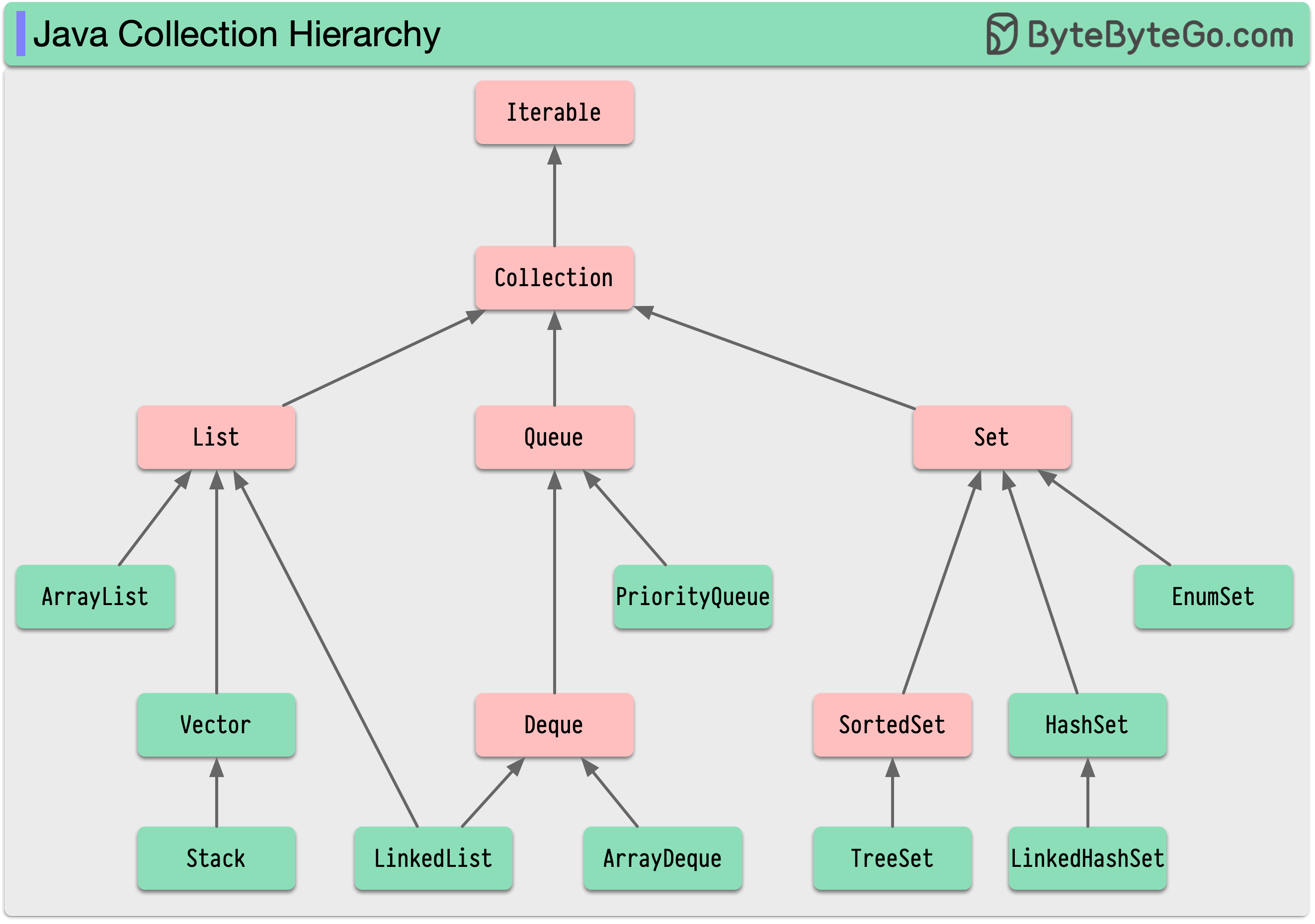
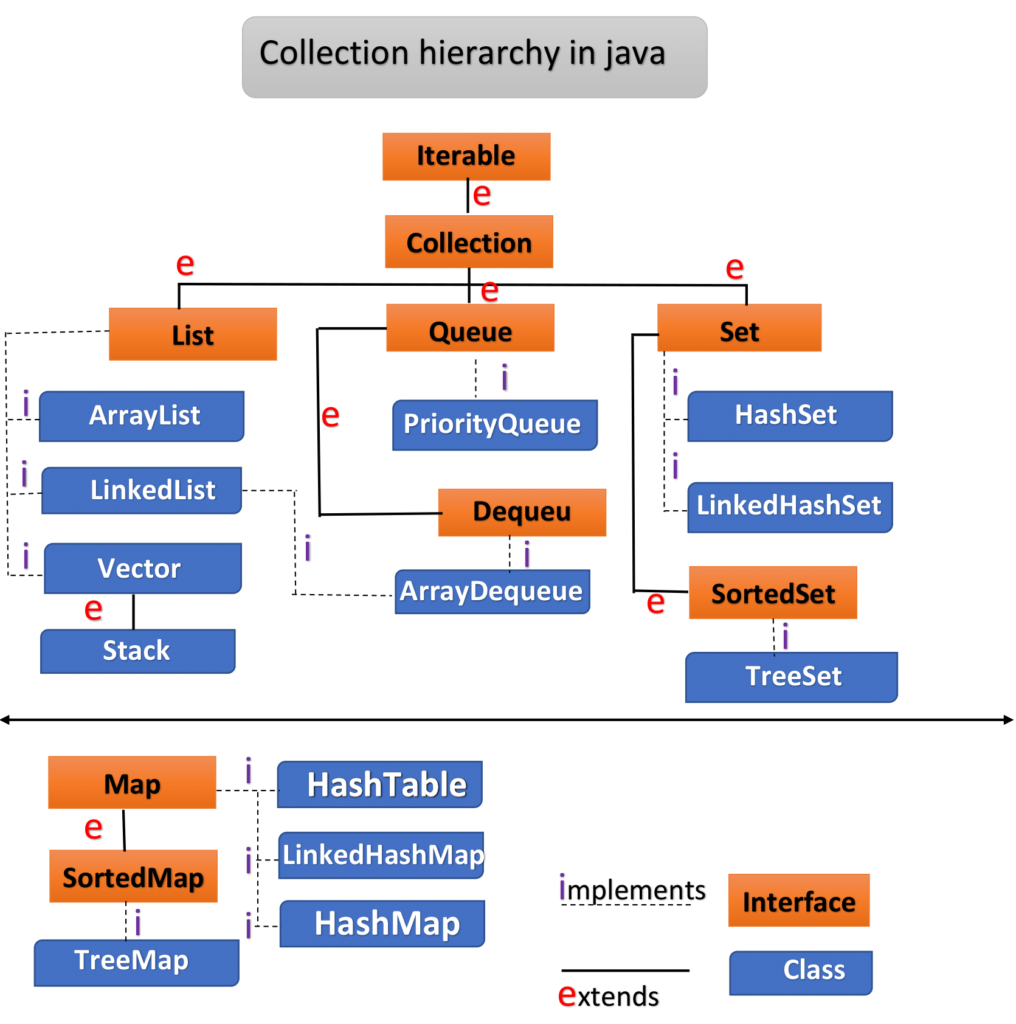
The Java Collections Framework is divided into four main parts:
List – Ordered collection, duplicates allowed
Set – No duplicates allowed
Queue / Deque – Used for processing elements
Map – Stores data as key-value pairs
1. List – Ordered Collection
What is a List?
A List stores elements in the same order in which they are added.
It also allows duplicate values.
Example:
Apple, Banana, Apple, Mango
ArrayList
Most commonly used List implementation
Key points:
Maintains insertion order
Allows duplicates
Very fast for reading data
Slower when inserting or deleting in the middle
Real-world use case:
Shopping cart items, API responses
LinkedList
Key points:
Maintains insertion order
Faster insertion and deletion
Slower access because elements are linked
Uses more memory than ArrayList
Real-world use case:
Playlists, queues, frequent add/remove operations
Vector (Legacy – Avoid)
Thread-safe but very slow
Old class
Rarely used in modern applications
2. Set – Unique Elements Only
What is a Set?
A Set does not allow duplicate values.
Order depends on the implementation.
Example:
101, 102, 103, 101 ❌
HashSet
Fastest Set implementation
No order guarantee
Allows one null value
Real-world use case:
Unique email IDs, user IDs
LinkedHashSet
Maintains insertion order
Slightly slower than HashSet
Real-world use case:
Recent searches without duplicates
TreeSet
Stores elements in sorted order
Slower compared to HashSet
Does not allow null values
Real-world use case:
Sorted roll numbers, rankings
3. Map – Key and Value Pair
What is a Map?
A Map stores data in this form:
Key → Value
Important rules:
Keys must be unique
Values can be duplicated
HashMap
Most widely used Map
Fast performance
No order guarantee
One null key allowed
Real-world use case:
User ID → User details
LinkedHashMap
Maintains insertion order
Slightly slower than HashMap
Real-world use case:
Recently viewed products
TreeMap
Stores data in sorted order based on key
No null keys allowed
Slower but ordered
Real-world use case:
Sorted reports, price lists
Hashtable (Legacy – Avoid)
Thread-safe
Very slow
Replaced by better alternatives
4. Concurrent Collections (Very Important)
These collections are designed for multi-threaded applications and are heavily used in backend systems.
ConcurrentHashMap
Thread-safe Map with high performance
Key points:
Does not lock the entire map
Multiple threads can read and write simultaneously
Faster than Hashtable
Does not allow null key or value
Real-world use case:
Microservices, APIs, high-traffic systems
CopyOnWriteArrayList
Thread-safe List for read-heavy applications
How it works:
Read operations are fast and lock-free
Write operations create a new copy of the list
Pros:
Safe iteration
No ConcurrentModificationException
Cons:
High memory usage
Slow write operations
Real-world use case:
Configuration data, read-heavy systems
5. Queue and BlockingQueue
Queue
Queue follows:
FIFO – First In, First Out
Used when elements need to be processed one by one.
BlockingQueue
Special type of Queue that:
Waits if the queue is empty
Waits if the queue is full
Used in producer-consumer problems.
Common implementations:
ArrayBlockingQueue
LinkedBlockingQueue
PriorityBlockingQueue
Real-world use case:
Thread pools, task scheduling
6. Deque and ArrayDeque
Deque (Double Ended Queue)
Allows:
Add/remove from front
Add/remove from end
ArrayDeque vs Stack
Stack is a legacy class
ArrayDeque is faster and modern
Important note:
ArrayDeque should be preferred over Stack.
7. PriorityQueue
What is PriorityQueue?
Elements are processed based on priority, not insertion order.
Real-world use case:
Job scheduling, CPU task management
8. Special Purpose Maps
WeakHashMap
Keys are weakly referenced
Entries are removed automatically when keys are no longer used
Use case:
Caching, memory-sensitive applications
EnumMap
Keys must be enum type
Very fast and memory efficient
Use case:
State machines, fixed set of keys
9. NavigableMap and NavigableSet
These provide advanced navigation methods like:
lower()
higher()
floor()
ceiling()
Used when range-based or sorted navigation is required.
10. Synchronized Collections
Java provides utility methods like:
Collections.synchronizedList(new ArrayList<>())
Key points:
Thread-safe
Entire collection is locked
Slower than concurrent collections
Performance Summary
Fastest (single thread): HashMap, HashSet
Ordered: LinkedHashMap, LinkedHashSet
Sorted: TreeMap, TreeSet
Best for concurrency: ConcurrentHashMap
Common Beginner Mistakes
Using List when Set is required
Expecting HashMap to maintain order
Using Vector or Hashtable in modern code
Ignoring concurrency requirements
Real-World Example
Online shopping application:
Cart items → ArrayList
Unique coupons → HashSet
User data → HashMap
Sorted price list → TreeMap
Concurrent user sessions → ConcurrentHashMap
Final Thoughts
Java Collections are not just an interview topic.
They are used everywhere in real applications.
Collections are not about memorizing classes.
They are about choosing the right data structure for the right problem.
If you understand Java Collections well, you already think like a strong backend Java developer.
.png)


Comments
Post a Comment